Category: News

  • CrowdStrike Software Blamed for Global Tech Meltdown

    CrowdStrike Software Blamed for Global Tech Meltdown

    A major software outage on Friday caused widespread disruption across critical infrastructure, impacting airlines, banks, supermarkets, TV stations, and countless other businesses. Flights were grounded, news broadcasts were interrupted, and workers were left scrambling as systems went down.

    The outage appears to be global in scope, affecting millions of systems across the globe, from Australia to the United States. The culprit? CrowdStrike, a leading cybersecurity provider, and its Falcon Sensor software.

    A blue screen of death.

    What is CrowdStrike Falcon?

    Headquartered in Austin, Texas, CrowdStrike is a cybersecurity giant with nearly 10,000 employees. The company provides software solutions to thousands of businesses worldwide, protecting them against viruses, malware, and cyberattacks.

    CrowdStrike Falcon is a key component of this defense system. It acts as a vigilant guardian, running silently in the background on corporate systems, constantly scanning for and neutralizing any potential threats.

    The Domino Effect: Why Microsoft Was Heavily Impacted

    While Microsoft itself wasn’t the source of the problem, the issue stemmed from CrowdStrike Falcon, which primarily operates on Microsoft Windows systems. This explains why Microsoft devices were disproportionately affected compared to Apple Macs, for example. Microsoft confirmed they were investigating the incident.

    Government Reassurance: Not a Cyberattack

    Importantly, government officials emphasized that there is no evidence suggesting this outage was caused by a malicious hack or cyberattack.

    “Our current information is this outage relates to a technical issue with a third-party software platform,” stated National Cyber Security Coordinator Michelle McGuinness.

    This highlights the critical role robust cybersecurity infrastructure plays in protecting vital systems.

    An Unprecedented Outage in the Modern, Interconnected World

    While technical glitches affecting businesses like telcos, banks, and supermarkets are not uncommon, the sheer scale of this outage is a stark reminder of our deep dependence on technology and the increasingly interconnected nature of our modern world.

    Home Computers Not Affected

    There’s no need to worry about your personal computer being impacted. CrowdStrike Falcon is primarily deployed on large business and enterprise systems, not typical home Windows PCs.

    Temporary Workaround Available

    CrowdStrike has issued a temporary solution to mitigate the issue. Here’s what they recommend:

    1. Boot your Windows machine into Safe Mode or the Windows Recovery Environment (usually by holding the F8 key before the Windows logo appears).
    2. Navigate to the specific directory containing the problematic file: C:\Windows\System32\drivers\Crowdstrike
    3. Locate the file named “C-00000291*.sys” and rename it to “C-00000291*.renamed”
    4. Reboot your computer normally.

    This workaround should allow you to regain access to your system until a permanent fix is implemented by CrowdStrike.

  • U.S. Blocks Kaspersky Sales Over National Security Concerns

    U.S. Blocks Kaspersky Sales Over National Security Concerns

    The U.S. Department of Commerce has taken a significant step, imposing a first-of-its-kind ban on Kaspersky Lab. Here’s a breakdown of the situation:

    The Ban:

    • The Bureau of Industry and Security (BIS) prohibits Kaspersky Lab’s U.S. subsidiary and affiliates from selling or offering security software in the country.
    • This decision is based on concerns that Kaspersky’s ties to the Russian government pose a national security risk.
    • The BIS alleges Kaspersky’s software could be used for data theft, espionage, and system disruptions.
    • The ban starts with new sales barred on July 20th, 2024. Existing customers can receive updates until September 29th but are urged to find alternatives.

    Kaspersky’s Response:

    • The company denies the allegations and claims the ban is based on “theoretical concerns” and the current political climate.
    • Kaspersky argues their transparency efforts demonstrate their trustworthiness and the ban unfairly hinders international cooperation against cybercrime.
    • They claim the ban ultimately benefits cybercriminals by restricting collaboration in the cybersecurity field.

    Background:

    • This isn’t the first time Kaspersky has faced scrutiny in the U.S.
    • In 2017, federal agencies were banned from using Kaspersky products due to similar security concerns.
    • The company has also been added to the Entity List for alleged cooperation with Russian intelligence agencies.

    Global Impact:

    • The U.S. joins other countries like Germany and Canada who have enacted restrictions on Kaspersky.
    • Kaspersky, with over 400 million users worldwide, serves major corporations across various industries.

    Uncertainties:

    • The long-term impact of the ban on Kaspersky’s global operations remains unclear.
    • Whether existing customers will heed the U.S. government’s warnings and switch to alternative security solutions is to be seen.

    The Future of Cybersecurity Collaboration:

    • Kaspersky’s claim that the ban hinders international cooperation raises concerns about the future of global efforts to combat cybercrime.

    This situation highlights the complex interplay between national security concerns, geopolitical tensions, and the importance of international collaboration in cybersecurity.

  • Major PC Brands Vulnerable: Critical Flaw Found in Preinstalled Firmware

    Major PC Brands Vulnerable: Critical Flaw Found in Preinstalled Firmware

    A high-severity vulnerability (CVE-2024-0762) has been discovered in the firmware (UEFI) of many popular PC models from major brands like Lenovo, Acer, Dell, and HP. This flaw could allow attackers to gain persistent, undetectable control over affected systems.

    Understanding the Threat:

    • UEFI Vulnerability: The flaw resides in the Phoenix SecureCore implementation of UEFI, a low-level firmware that boots your computer before the operating system takes over.
    • Potential Impact: Attackers exploiting this vulnerability could potentially:
      • Gain Root Access: Infect the system at a very deep level, granting them complete control over the hardware.
      • Evade Security Measures: Bypass traditional antivirus and anti-malware software due to the deep-rooted nature of the infection.
      • Persistent Threat: Remain hidden even after a complete operating system reinstall.

    Technical Breakdown (Simplified):

    • Buffer Overflow: The vulnerability stems from improper memory allocation during a specific function call related to the Trusted Platform Module (TPM) configuration.
    • Exploitation Method: By manipulating a variable size, attackers could potentially overflow a buffer and inject malicious code during the boot process.

    Affected Devices and Patch Availability:

    • Widespread Impact: Millions of PCs using Intel processors and Phoenix SecureCore firmware are potentially vulnerable. This includes various models from Lenovo, Acer, Dell, and HP.
    • Patch Available: Phoenix Technologies released a patch in April 2024 to address this vulnerability.

    Taking Action:

    • Update Your UEFI Firmware: It’s crucial to update your UEFI firmware as soon as possible. Check your PC manufacturer’s website for specific instructions on how to update your firmware.
    • Stay Informed: Monitor your PC manufacturer’s website for updates and ensure you have the latest firmware patch installed.
    • Consider Additional Security Measures: Explore security solutions that offer advanced protection against firmware-level attacks, especially for high-risk systems.

    Importance of Patching:

    The critical nature of this vulnerability highlights the importance of keeping your firmware up-to-date. By patching this flaw promptly, you can significantly reduce the risk of having your system compromised by persistent malware lurking within the UEFI layer.

  • Unpatched Vulnerability: Hackers Can Easily Forge Microsoft Emails

    Unpatched Vulnerability: Hackers Can Easily Forge Microsoft Emails

    A critical vulnerability in Microsoft’s systems has been discovered that allows attackers to impersonate Microsoft corporate email accounts. This flaw could be exploited for large-scale phishing attacks, potentially compromising sensitive information or harming Microsoft’s reputation.

    Details of the Vulnerability:

    • Discovered by security researcher Vsevolod Kokorin (@Slonser).
    • Allows anyone to forge Microsoft corporate email addresses, making phishing attempts appear legitimate.
    • Technical details are not being publicly disclosed to prevent immediate exploitation.

    Timeline and Response:

    • Kokorin reported the vulnerability to Microsoft but claims the company could not replicate the issue.
    • Frustrated by the lack of response, Kokorin publicly disclosed the flaw on platform X (formerly Twitter).
    • Microsoft has not yet responded to requests for comment.

    Current Status and Recommendations:

    • The vulnerability remains unpatched, raising concerns about potential ongoing exploitation.
    • It is strongly recommended that Microsoft prioritize patching this critical flaw to protect its users and reputation.

    Following Developments:

    • We will continue to monitor the situation and report on any updates from Microsoft or the security community.

    Actionable Steps for Users:

    • While details are limited, be wary of any emails claiming to be from Microsoft, especially those with unusual urgency or requests for sensitive information.
    • If unsure about an email’s legitimacy, contact the sender through a trusted channel to verify.
    • Consider using email security solutions that can help detect phishing attempts.

    By patching this vulnerability and raising awareness, Microsoft and its users can work together to mitigate the risk of email spoofing attacks.

  • Beware Fake Chrome Alerts! Hackers Use Malicious PowerShell Scripts to Steal Your Data

    Beware Fake Chrome Alerts! Hackers Use Malicious PowerShell Scripts to Steal Your Data

    Malicious “Fixes” Lurk Behind Fake Chrome, Word, and OneDrive Errors

    Beware of a cunning malware campaign exploiting user trust in familiar software. Hackers are tricking victims into running malicious PowerShell scripts disguised as fixes for fake Google Chrome, Microsoft Word, and OneDrive errors.

    Campaign Details:

    • Multiple Threat Actors: This campaign involves a coordinated effort by multiple actors, including ClearFake, ClickFix, and TA571 (known for spam and ransomware attacks).
    • Social Engineering Tactics: The attacks use website overlays displaying fake error messages that urge users to download and run a “fix” script via PowerShell.
    • Varied Delivery Methods: The malicious script can be delivered through:
      • Compromised websites with JavaScript overlays
      • Booby-trapped HTML attachments resembling Word documents
      • Spam emails with malicious links

    The ‘ClearFake’ attack chain
    Source: Proofpoint

    Here’s a breakdown of the different attack chains observed:

    1. ClearFake’s Blockchain-Based Delivery:

    • Users visit a compromised website that loads a malicious script hosted on the Binance Smart Chain.
    • A fake Google Chrome error message appears, prompting the user to install a “root certificate” by copying and running a PowerShell script (as administrator).
    • If executed, the script performs various checks and downloads additional payloads, including:
      • An information stealer
      • Tools to reset the DNS cache and clear clipboard content
    • This attack targets users who might trust certificates as part of a secure connection.

    Fake Google Chrome error
    Source: Proofpoint

    2. ClickFix Injects Fake Errors on Websites:

    • Compromised websites are injected with code that creates an iframe overlay displaying a fake Google Chrome error message.
    • Users are instructed to open PowerShell (as administrator) and paste a provided script, leading to malware infections.

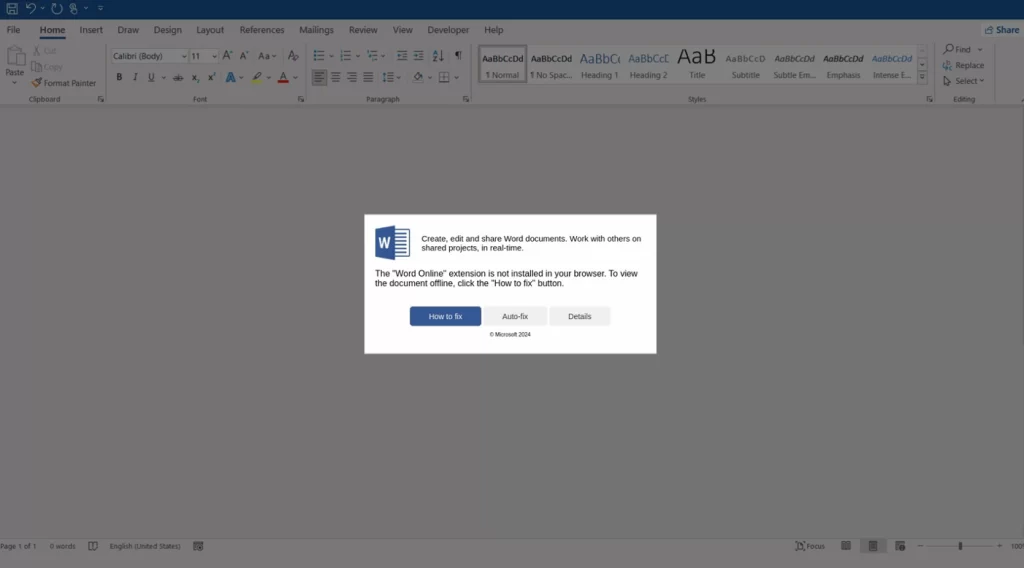
    Fake Microsoft Word error leads to malware
    Source: Proofpoint

    3. Email Phishing with Fake Word Document:

    • Emails disguised as containing Word documents arrive with attachments.
    • When opened, the attachment displays a fake error message asking users to install the “Word Online” extension to view the document.
    • Two “fix” options are offered:
      • “How to fix”: copies a base64-encoded PowerShell command to the clipboard for manual execution.
      • “Auto-fix”: attempts to download a malicious file (MSI or VBS) disguised as a fix, leading to further infections.

    Protecting Yourself:

    • Never run scripts from untrusted sources, especially through PowerShell.
    • Be wary of unexpected error messages, even from seemingly familiar apps.
    • Verify the legitimacy of attachments and website links before opening them.
    • Keep your software, including operating system and browser, updated with the latest security patches.
    • Consider security solutions that can detect and block malicious PowerShell scripts.

    By understanding these tactics, you can avoid falling victim to this deceptive campaign and safeguard your system from malware infections.

  • Millions Safeguarded: US Operation Shuts Down Notorious Botnet

    Millions Safeguarded: US Operation Shuts Down Notorious Botnet

    A US-led international law enforcement operation has successfully dismantled the 911 S5 botnet, believed to be the world’s largest ever. This global network of compromised devices, primarily targeting residential Windows computers, facilitated a vast array of criminal activities including cyberattacks, large-scale fraud, child exploitation, and more.

    The Scope of 911 S5:

    • Network of over 19 million compromised devices with IP addresses spanning the globe, including over 600,000 in the US alone.
    • Offered access to these compromised devices for various criminal activities through a proxy service.

    Alleged Mastermind and Charges:

    • YunHe Wang, a 35-year-old Chinese national, was arrested and faces charges related to creating and operating 911 S5.
    • Potential penalties include up to 65 years in prison if convicted on all charges.
    • Wang is accused of generating nearly $99 million from selling access to compromised IP addresses between 2018 and 2022.

    How Did It Work?

    • Malware was distributed through seemingly legitimate applications like virtual private networks (VPNs) and pay-per-install services.
    • Wang allegedly controlled a network of 150 servers, 76 of which were located in the US, for managing the botnet and selling access.
    • These compromised devices were used as proxies, allowing criminals to mask their locations and activities.

    Criminal Activities Facilitated by 911 S5:

    • Theft of billions of dollars from financial institutions and government programs, including fraudulent claims during the COVID-19 pandemic.
    • Cybercrime and online fraud.
    • Stalking, bomb threats, and illegal exports.
    • Transmission and possession of child exploitation materials.

    Law Enforcement Response:

    • A collaborative effort involving US, Singaporean, Thai, and German authorities disrupted 911 S5’s infrastructure.
    • Over 23 domains and 70 servers were seized, effectively shutting down the botnet and its ability to target new victims.
    • Approximately $30 million in assets were seized from connected residences, with potential for further forfeiture.

    Significance of the Takedown:

    The dismantling of 911 S5 represents a major victory for international law enforcement in disrupting a vast criminal network. This action serves as a deterrent to future cybercrime operations and protects individuals and organizations worldwide.